
TL;DR:
- True smart home installation involves planning, wiring, integration, and homeowner training, not just device setup.
- Professionals handle complex wiring, system integration, and long-term support, especially in older Kansas City homes.
- Proper installation ensures reliable automation, security, and value, preventing frustration and security gaps.
Plenty of Kansas City homeowners assume that smart home devices simply work out of the box. You plug them in, download the app, and your house runs itself. Reality is messier. True smart home integration means connecting lighting, thermostats, locks, cameras, and sensors so they actually talk to each other and to you. Get it wrong and you end up with a house full of devices that don't sync, a network that drops at the worst moment, and security gaps you didn't know existed. This guide breaks down what smart home installation really involves, what each step looks like, and how to decide whether you should tackle it yourself or call a pro.
Table of Contents
- What is smart home installation?
- Core steps in a smart home installation
- DIY vs. professional installation: Choosing what's right for you
- Kansas City-specific considerations: Wiring, network, and old home challenges
- Ensuring long-term value and homeowner support
- Our take: What most guides miss about smart home installation
- Explore smart home upgrades with MaddLadder
- Frequently asked questions
Key Takeaways
| Point | Details |
|---|---|
| Smart home integration defined | It turns individual devices into one seamless, app-controlled system. |
| DIY vs. professional install | DIY can save money, but complex systems and wiring call for a pro. |
| Kansas City home challenges | Old wiring, Wi-Fi gaps, and code rules make expert help valuable. |
| Commissioning and support | Great installers train you and support your system for long-term success. |
What is smart home installation?
Let's clear up a common misunderstanding. Buying a smart bulb and screwing it in is not smart home installation. What smart home installation includes is actually the planning and implementation work that turns a residence's devices into an integrated system controlled by an app or assistant. That's a fundamentally different task.
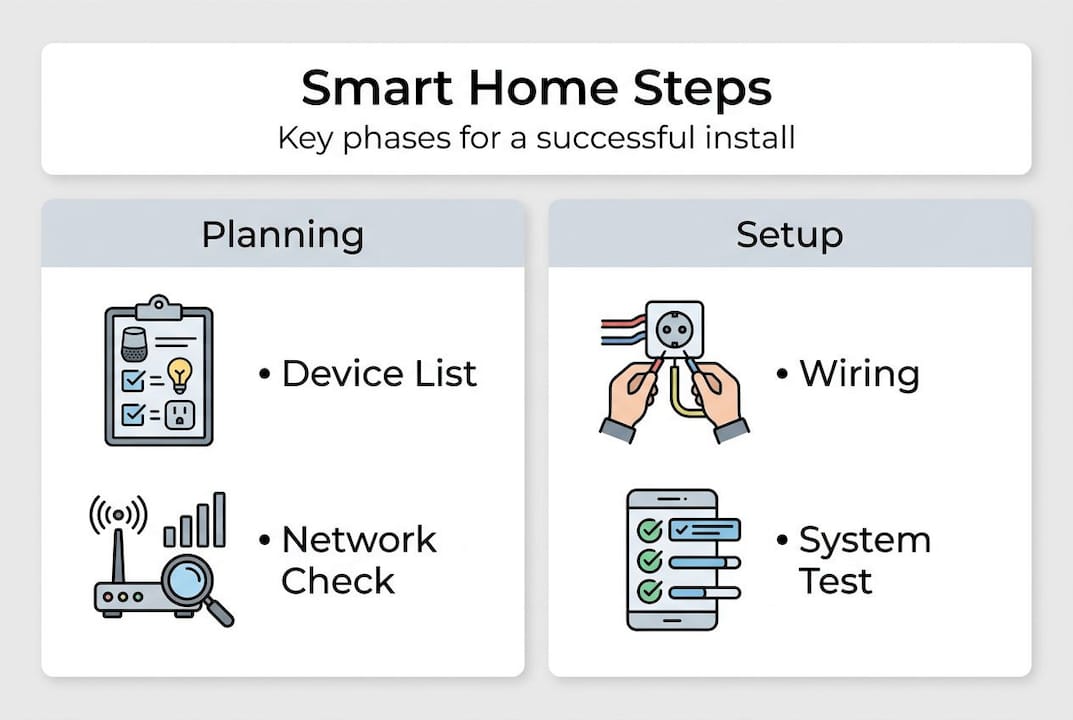
A professional installation typically unfolds in five phases:
- Site assessment: A technician walks your home to map existing wiring, Wi-Fi coverage, and device placement options.
- System design: You choose devices, platforms, and how everything will connect before anything is purchased or installed.
- Device and wiring installation: Hardware goes in, cables get routed, and hubs are mounted in the right locations.
- Setup and commissioning: Devices are paired, automations are programmed, and the system is tested end to end.
- Homeowner handoff: You receive training on the app, voice controls, and how to troubleshoot simple issues.
Why does this matter? Because done right, smart home technology improves efficiency and security in ways that add measurable value to your home. Done poorly, it creates frustration and potential vulnerabilities.
Pro Tip: Before signing any contract, ask your installer to walk you through each phase and confirm what's included in commissioning. Many providers charge extra for programming and training.
The bottom line is that smart home installation is a project, not a purchase. Treating it that way from the start saves you significant headache later.
Core steps in a smart home installation
With the big picture clear, let's walk through a typical smart home installation so you know what to expect and what to ask about.
A solid installation steps methodology starts with a plan, moves to hub selection, installs core systems, connects voice assistants, then tests, automates, and secures the network. Each stage builds on the one before it.
- Define your goals. Do you want energy savings, better security, or both? Your answer shapes every device and platform decision.
- Choose a compatible hub or platform. Amazon Alexa, Google Home, Apple HomeKit, and Samsung SmartThings all have different strengths. Picking the wrong one early creates costly headaches.
- Install core systems first. Lighting and climate control go in before the more complex security devices. This gives you a stable base to build on.
- Add security devices. Cameras, smart locks, and motion sensors integrate more reliably once your network is stable and your hub is configured.
- Connect voice assistants and automate routines. This is where your home starts feeling genuinely smart, not just remote-controlled.
- Test every integration. Each device should trigger correctly, respond quickly, and fail gracefully if the internet drops.
- Secure your network. Change default passwords, enable encryption, and separate smart devices onto their own Wi-Fi network if possible.
Pro Tip: If you're considering smart home upgrades in an older Kansas City home, ask about wiring compatibility before you buy any hardware. Some smart switches require a neutral wire that older homes simply don't have.
This sequence protects you from the most common rookie mistake: buying a dozen devices before confirming they work together. Think of it like DIY safety upgrades, where planning before acting is the difference between a smooth project and a disaster. And just like other property value upgrades, smart installation done correctly pays dividends when it's time to sell.
DIY vs. professional installation: Choosing what's right for you
But who should actually carry out installation? Should you go DIY, or do Kansas City pros earn their keep? Let's break it down.
Honestly, both paths work under the right conditions. Here's a side-by-side look:
| Factor | DIY | Professional |
|---|---|---|
| Upfront cost | Lower | Higher |
| Skill required | Moderate to high | Handled for you |
| Wiring work | Risk of errors | Licensed and code-compliant |
| System integration | Hit or miss | Tested end to end |
| Time investment | Significant | Minimal for homeowner |
| Ongoing support | Self-managed | Often included |
Many consumer guides are honest that some devices are plug-and-play and can be installed by homeowners, but heavier wiring and system integration are where professional help is recommended. That matches our experience exactly.
For simpler tasks like adding a smart plug or a Wi-Fi speaker, DIY is fine. But here's where you should call a pro:
- Any work involving existing wiring or your electrical panel
- Installing hardwired security cameras or doorbells
- Integrating more than five devices across multiple platforms
- Setting up whole-home automation with scenes and routines
Professional installers handle wiring, integration, and testing from end to end, which is where amateurs most commonly run into expensive problems.
"The goal is a home that runs quietly in the background, not one you're constantly troubleshooting." Choosing the right installer from day one is how you get there.
If you need installation and assembly services that cover both the technical and the physical side of a smart home project, working with a team that understands both is the smarter call.
Kansas City-specific considerations: Wiring, network, and old home challenges
Kansas City homes bring unique challenges. Here's what you need to know before planning your upgrade.
Kansas City has a rich stock of older housing, and that's a double-edged sword. Character and craftsmanship, yes. But also knob-and-tube wiring, undersized junction boxes, and layouts that make Wi-Fi coverage genuinely difficult. Network reliability and protocol compatibility are frequent sources of failure, especially in larger or older homes.
Here's what tends to cause trouble:
| Challenge | Why it matters | Typical solution |
|---|---|---|
| Outdated wiring | Smart switches need neutral wires | Rewire or use no-neutral smart switches |
| Wi-Fi dead zones | Devices lose connection, automations fail | Mesh Wi-Fi system or access points |
| Protocol conflicts | Zigbee, Z-Wave, and Wi-Fi don't always mix | Hub that supports multiple protocols |
| Small junction boxes | Can't fit smart switch components | Box replacement or new mounting |
The electrical side deserves special attention. High-voltage circuit work involving 120V or 240V circuits requires a licensed electrician under the National Electrical Code. This isn't optional. Unlicensed wiring work can void your homeowner's insurance and create serious safety risks.
Pro Tip: Before upgrading, pull up a floor plan and mark your router location. Then walk your home with your phone and watch where the signal drops. Those are your problem zones, and mesh nodes or access points solve them faster than any smart device will.
For deeper guidance on what's safe to tackle yourself, our electrical repair guide covers the line between DIY-friendly tasks and work that needs a license.
Ensuring long-term value and homeowner support
Once your home is smart, how do you keep it reliable and supported? Here's what to confirm before any contract is signed.
The install is only half the job. What happens after the technician leaves often determines whether your investment pays off or becomes a source of daily frustration. Professional scope commonly includes design, programming, and homeowner onboarding, not only physical device placement, so ask vendors exactly what they include in commissioning and handoff.
Before signing anything, confirm these items with your installer:
- Commissioning report: A written record of every device, its settings, and how it's connected.
- App and routine walkthrough: Someone should show you how to use every feature you're paying for.
- Support policy: What happens if a device drops off the network in six months? Is there a support line or a fee?
- Upgrade path: As new devices hit the market, can your hub and platform support them without a full reinstall?
- Network documentation: Your installer should hand over Wi-Fi credentials, hub login, and device names in writing.
These questions separate serious professionals from people who just install hardware and disappear. When you're scheduling upgrades for your Kansas City home, push for a provider who treats the handoff as part of the job, not an afterthought.
A smart home that you can't confidently manage is not a smart home. It's a complicated one.
Our take: What most guides miss about smart home installation
Here's the truth that polished installation guides rarely say out loud: even experienced pros run into surprises. Wiring doesn't match the floor plan. The hub firmware has a conflict with the new lock. The mesh node placement that looked perfect on paper creates a dead spot in the master bedroom.
The best investments in smart home installation are almost never the flashiest devices. They're in upfront design and honest assessment. The homeowners who get the most out of their systems are the ones who asked hard questions early: What happens if the internet goes down? How are firmware updates handled? What's the recovery plan if the hub fails?
Smart homes are only as strong as their weakest link, and that weak link is almost always the network or a misconfigured automation. We've seen it repeatedly. As we explain in our piece on handyman time savings, the real value of a professional isn't just skill. It's the time and mistakes you avoid by not going it alone.
Explore smart home upgrades with MaddLadder
Ready to start your smart home journey with experienced Kansas City professionals?

At MaddLadder, we work with Kansas City homeowners to plan, install, and commission smart home systems that actually work the way you expect. Our Kansas City smart home experts handle everything from thermostat upgrades and camera installation to full system design and app setup. And when your project involves wiring, our team includes support for licensed electrical work so every part of your upgrade is code-compliant and covered. Free estimates, fast scheduling, and local expertise. Reach out today and let's talk about what your home needs.
Frequently asked questions
What devices can be included in a smart home installation?
Smart home installation integrates lighting, locks, thermostats, cameras, sensors, and speakers, all connected through a single hub or app for unified control.
When do I need a licensed electrician for smart home upgrades?
Any work touching 120V or 240V circuits requires a licensed electrician in all states under the National Electrical Code, no exceptions.
What should I ask my smart home installer?
Ask about design scope, device compatibility, network testing, aftercare, and whether design, programming, and onboarding are included in their quoted price.
Is professional smart home installation worth the cost?
For most Kansas City homeowners, yes. Professional installation reduces integration issues, handles wiring safely, and improves long-term reliability in ways DIY setups often can't match.